
When you’re promoting a new music release, it’s easy to end up with several different versions of the same campaign link. One URL might be saved in a group chat, another could appear in a social media caption draft, and a third might be included in your release planning documents.
Before long, your team may be unsure which link is correct.
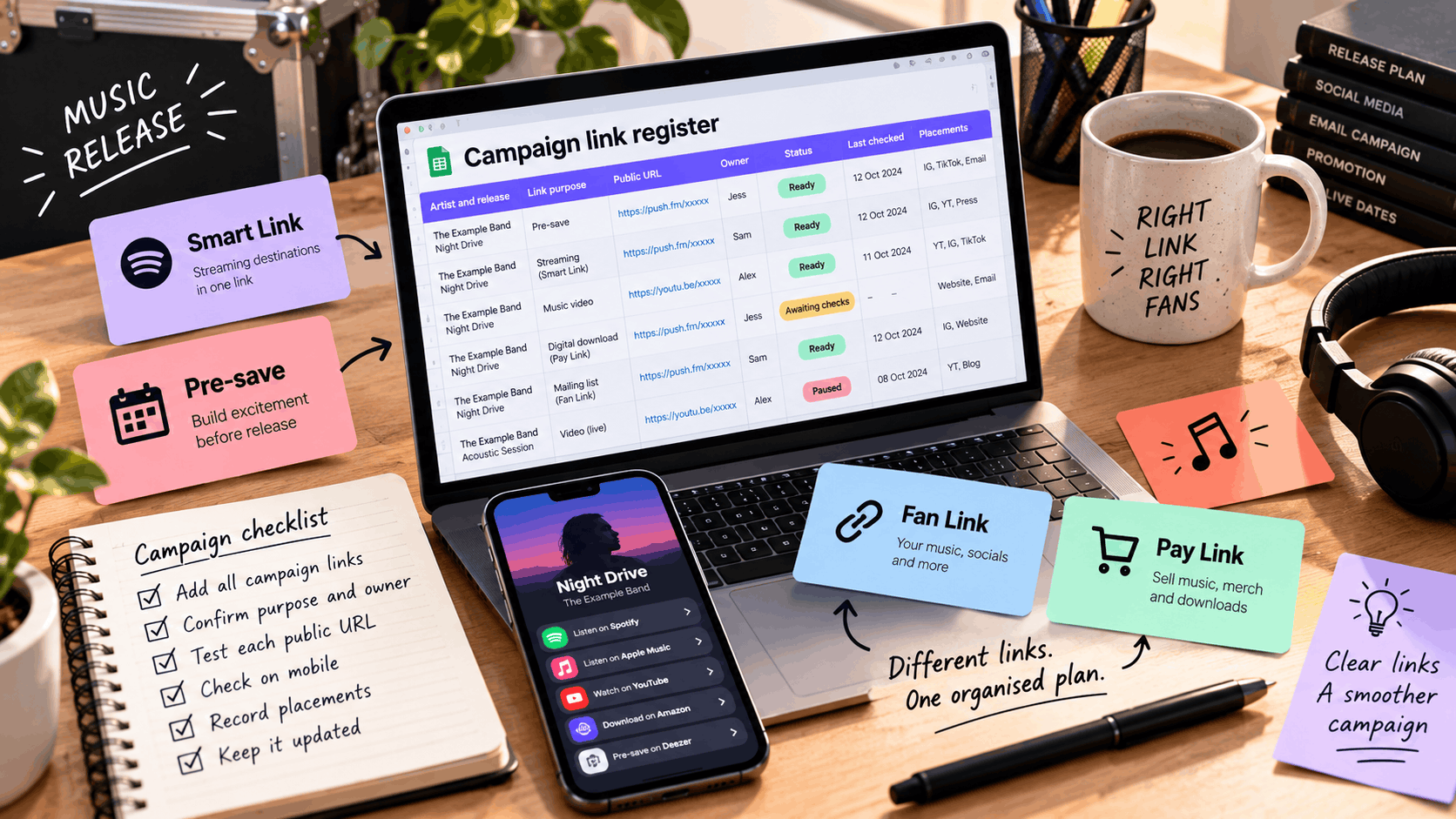
A music campaign link register provides a simple way to keep everything organised.
By recording your campaign URLs, their purposes, who manages them and when they were last checked, you can give everyone involved in your release a reliable place to find the right information.
Whether you’re an independent artist managing your own promotion or part of a larger artist team, a shared link register can help prevent incorrect URLs from appearing in your marketing.
The aim isn’t to create another complicated system. It’s to maintain one clear, up-to-date record of the links your audience needs.
What is a music campaign link register?
A music campaign link register is a shared document or spreadsheet containing the public URLs used throughout a music promotional campaign.
It helps artists, managers and marketing teams keep track of where each link leads and who is responsible for maintaining it.
For example, a release campaign might include:
- A Smart Link for streaming destinations.
- A Pre-save link for an upcoming single.
- A Fan Link for artist profiles and social media.
- A Reward Link for exclusive content.
- A Pay Link for digital downloads.
- A link to an official music video.
- A mailing-list signup page.
Each link serves a different purpose, so it’s important that everyone understands which one to use.
Why should artist teams use a link register?
A shared register can help you:
- Prevent outdated links from being shared.
- Identify the correct URL for each campaign activity.
- Keep track of who manages individual links.
- Record when destinations were last tested.
- Identify where links have been published.
- Coordinate changes across multiple promotional channels.
- Maintain useful information after a campaign ends.
It can also save time when preparing social media posts, emails and other promotional materials.
Instead of searching through old conversations, your team can refer to one document.
PUSH.fm’s Smart Links allow artists to bring multiple music destinations together through a single shareable URL.
A link register helps ensure everyone promoting that release knows which public address to use.
Record the public URL and its purpose
The most important information in your register is the public address that fans are supposed to open.
This should be the URL you intend to share through your promotional channels.
Keep public links separate from editing links
When managing a campaign, you may have access to several types of URLs.
For example:
- Public campaign links.
- Account dashboard pages.
- Editing interfaces.
- Internal previews.
- Shared planning documents.
These shouldn’t be treated as interchangeable.
Your register should clearly identify the public URL intended for fans.
If your team needs to record internal editing links, keep them in a separate, appropriately secured location.
Explain what each link does
Avoid vague descriptions such as:
- Main link
- Music link
- New URL
- Campaign page
These labels can become confusing when you’re managing several promotional activities.
Instead, use specific descriptions such as:
- Streaming page for the studio single.
- Pre-save campaign for the upcoming EP.
- Digital download purchase page.
- Acoustic performance video.
- Mailing-list signup for release updates.
A clear purpose helps team members choose the correct destination without having to open every link.
Use these music campaign link register columns
You don’t need specialist software to create a useful register.
A spreadsheet or shared document is enough to get started.
The following columns provide a practical structure for organising your campaign URLs.
| Column | What to record |
|---|---|
| Artist and release | The official artist and release names used throughout the campaign |
| Link purpose | Whether the link is for listening, pre-saving, signing up, accessing rewards or purchasing |
| Public URL | The tested address intended for fans |
| Owner | The person responsible for maintaining the link |
| Status | Whether the link is ready, awaiting information, paused or archived |
| Last checked | The date and time of the most recent public test |
| Placements | Where the URL appears, such as social bios, videos, emails, adverts or printed materials |
| Notes | Recording versions, unresolved issues, replacement URLs or other relevant details |
This structure gives your team enough information to understand each link without creating unnecessary administration.
Example of a completed link register
Imagine you’re preparing a campaign for an upcoming single titled Night Drive.
Your register might look like this:
| Artist and release | Link purpose | Public URL | Owner | Status |
|---|---|---|---|---|
| Artist A – Night Drive | Pre-save campaign | [Verified Pre-save URL] | Artist manager | Ready |
| Artist A – Night Drive | Streaming Smart Link | [Verified Smart Link URL] | Marketing team | Awaiting release |
| Artist A – Night Drive | Music video | [Verified video URL] | Artist manager | Ready |
| Artist A – Night Drive | Digital download | [Verified Pay Link URL] | Artist manager | Awaiting checks |
| Artist A – Night Drive | Mailing-list signup | [Verified signup URL] | Marketing team | Ready |
These are illustrative entries. Replace the placeholders with your actual campaign information.
You can maintain the remaining columns, such as testing dates and placements, within the same spreadsheet.
Keep sensitive information out of the register
Your link register should contain campaign information, not private account credentials.
Avoid including:
- Passwords.
- Payment-card details.
- Private access tokens.
- Recovery codes.
- Sensitive customer information.
Use your platform’s supported account access arrangements for anyone who needs to manage campaign links.
Agree on a consistent naming convention
A clear naming convention makes your register easier to understand, particularly when you’re managing multiple releases.
You don’t need a complicated system.
The goal is to make every entry recognisable at a glance.
Use the artist, release and link purpose
A simple format could be:
[Artist name] / [Release title] / [Link purpose]
For example:
- Artist A / Night Drive / Pre-save
- Artist A / Night Drive / Streaming
- Artist A / Night Drive / Music video
- Artist A / Night Drive / Digital download
- Artist A / Night Drive / Acoustic version
This makes it easier to distinguish between destinations associated with the same release.
Keep names short and consistent
Avoid creating different naming styles for every campaign.
For example, these entries could cause confusion:
- Night Drive main link
- Artist A new single
- ND streaming page
- Release link final
Although they might refer to the same destination, their names don’t make that clear.
Choose one format and document it so everyone follows the same approach.
Don’t change public URLs unnecessarily
Your internal naming convention doesn’t need to match the public URL exactly.
If a Smart Link has already been shared through social media, emails or printed materials, avoid changing its public address simply to make the register look tidier.
A public URL may already appear in places that are difficult or impossible to update.
Instead, record the existing address accurately and review where it’s being used before considering changes.
Test every link before marking it ready
A link shouldn’t be marked as ready simply because it has been created.
Before sharing it publicly, check that the destination works as expected.
Test the public URL
Open the link in a browser and review the page from a visitor’s perspective.
Check that:
- The page loads correctly.
- The artist name is accurate.
- The release title is correct.
- The artwork matches the intended release.
- The main campaign action is clear.
- Every listed destination opens correctly.
- The correct recording version is linked.
- The page works on a mobile device.
If you’re using a music Smart Link, test each streaming destination rather than assuming they’re all correct.
Check the main campaign action
Different links require different checks.
For example:
Smart Link
Confirm that the listening destinations open the intended recording.
Pre-save link
Check that the campaign page displays the correct upcoming release and that the supported pre-save journey works.
Pay Link
Review the product information, price and purchase journey supported by your setup.
Fan Link
Confirm that the profile links and other destinations are accurate.
You can find guidance on managing these features through the PUSH.fm Help Centre.
Record when the link was tested
Once you’ve completed your checks, update the register with the date and time.
For example:
Last checked: 28 October 2026, 10:30 GMT
Only update this field after an actual test.
Don’t automatically copy the previous date forward each week.
If something couldn’t be verified, record that limitation in the notes rather than marking the link as fully checked.
Assign an owner to every campaign link
When several people are involved in a release, it’s important to know who is responsible for each destination.
Without clear ownership, problems can be overlooked because everyone assumes someone else is handling them.
Decide who manages each link
Your team might assign responsibility based on the type of destination.
For example:
| Link type | Example owner | Main responsibility |
|---|---|---|
| Streaming Smart Link | Marketing manager | Checking streaming destinations |
| Pre-save campaign | Release manager | Maintaining the pre-release page |
| Fan Link | Artist manager | Updating artist profiles and promotional destinations |
| Pay Link | Artist or product manager | Maintaining digital product information |
| Music video | Video or marketing manager | Checking the published video destination |
These are examples rather than fixed roles.
For independent artists, one person may be responsible for every link.
The important thing is that ownership is clearly documented.
Establish how issues should be reported
Make sure team members know what to do if they discover a problem.
For example, if a social media manager notices that a streaming link opens the wrong recording, they should know who to contact.
The responsible person can then investigate, make the necessary changes and update the register.
This helps prevent several people from making conflicting changes.
Keep track of where each link is shared
A public campaign URL may appear in several places.
Recording those placements can make future updates much easier.
Common promotional placements
Your register might identify links used in:
- Instagram bios.
- TikTok profiles.
- YouTube video descriptions.
- Facebook posts.
- Email newsletters.
- Artist websites.
- Digital adverts.
- Press releases.
- QR codes.
- Posters and flyers.
You don’t necessarily need to record every individual social media post.
Focus on placements that are important to the campaign or may need updating later.
Why are placements important?
Imagine you’ve shared a Pre-save link before release day.
Once the music becomes available, you may want to direct fans towards the completed release.
If your team knows where the original URL was published, it becomes easier to review which placements need attention.
This is particularly important for permanent or difficult-to-edit materials, such as printed QR codes.
Tip: If you’re planning to print a QR code, confirm the public URL and its intended long-term use before printing.
Log changes when a destination moves
Campaign links sometimes need updating.
A streaming destination might change, a video may be replaced or a campaign page might need correcting.
When this happens, it’s important to distinguish between changing a destination and changing the public URL itself.
Updating a destination within an existing page
For example, you might edit a Smart Link to correct one of its streaming destinations.
If the public Smart Link address remains unchanged, existing promotional placements can continue using that URL.
However, you should still:
- Record the change.
- Test the updated destination.
- Check the public page.
- Update the last-checked date.
- Note any remaining issues.
You can find guidance on updating and managing links in the PUSH.fm Help Centre.
Replacing the public URL
Changing the public address is a different situation.
If you replace a campaign URL, existing placements may continue pointing towards the old address.
Your register should identify which locations need updating.
For example:
- Artist website.
- Social media bios.
- YouTube descriptions.
- Email templates.
- Digital advertisements.
- Printed QR codes.
Some placements may be easy to edit, while others may be permanent.
Before replacing a public URL, consider whether the original address still needs to remain active.
Keep a record of important changes
For campaigns involving several people, a simple change log can be useful.
| Date | Link | Change made | Checked by |
|---|---|---|---|
| [Date] | Night Drive Smart Link | Corrected streaming destination | Marketing manager |
| [Date] | Night Drive video | Updated official video URL | Artist manager |
| [Date] | Night Drive Pay Link | Updated product description | Product manager |
This provides a basic record of what changed and who checked it.
Archive campaign links with enough context
When a release campaign ends, you may no longer need to actively promote every link.
However, that doesn’t mean the information should immediately disappear from your register.
Older URLs may still receive visits from previous promotional materials.
Why keep archived campaign records?
An older link might still appear in:
- A YouTube video description.
- A social media post.
- A press article.
- An email newsletter.
- A printed poster.
- A QR code on merchandise.
Keeping a record helps your team understand where those links came from and what they were originally intended to do.
Record the status accurately
You might use statuses such as:
Ready: The link has been tested and is suitable for its intended use.
Awaiting information: The link cannot be fully completed or verified yet.
Paused: The campaign is temporarily inactive or the link should not currently be promoted.
Archived: The campaign is no longer actively promoted, but its details are retained for reference.
Remember that marking a row as archived in your register doesn’t necessarily archive the actual link on PUSH.fm.
These are separate actions.
Decide whether older links still need maintenance
Before archiving a campaign, consider:
- Is the public URL still active?
- Does it lead to useful content?
- Is it still being accessed through older placements?
- Who is responsible for maintaining it?
- Are any destinations outdated?
Avoid deleting useful records simply because a release is no longer new.
Your campaign history may help explain why an older URL is still being used.
Create your music campaign link register
If you’re preparing for your next release, start with a simple spreadsheet.
You don’t need to record every link you’ve ever created.
Begin with the destinations you’re actively using for one campaign.
Music campaign link register template
| Artist and release | Link purpose | Public URL | Owner | Status | Last checked | Placements | Notes |
|---|---|---|---|---|---|---|---|
| [Artist / Release] | Streaming | [URL] | [Name] | [Status] | [Date] | [Placements] | [Notes] |
| [Artist / Release] | Pre-save | [URL] | [Name] | [Status] | [Date] | [Placements] | [Notes] |
| [Artist / Release] | Music video | [URL] | [Name] | [Status] | [Date] | [Placements] | [Notes] |
| [Artist / Release] | Digital download | [URL] | [Name] | [Status] | [Date] | [Placements] | [Notes] |
| [Artist / Release] | Mailing-list signup | [URL] | [Name] | [Status] | [Date] | [Placements] | [Notes] |
Replace the placeholders with your own campaign information.
You can add or remove columns depending on your team’s needs.
A simple checklist before sharing your register
Before your campaign begins:
- Add every public link associated with the release.
- Confirm the purpose of each destination.
- Assign an owner to every link.
- Test the public URLs on mobile.
- Check the artist names, release details and destinations.
- Record the date of each completed test.
- Identify the main promotional placements.
- Make sure everyone knows where to find the register.
Once these steps are complete, your team will have a shared reference for the campaign.
Keep your music campaign links organised
Managing music promotion often involves several platforms, people and destinations.
Without a clear system, it’s easy for outdated or incorrect URLs to spread through a campaign.
A music campaign link register helps you avoid that confusion by keeping your public addresses, their purposes and their owners in one place.
Start with a straightforward spreadsheet, agree on a consistent naming convention and test every link before marking it ready.
As your campaign develops, record important changes and keep track of where your URLs are being shared.
You don’t need an elaborate system to stay organised.
A small, accurate and regularly maintained link register gives your artist team one dependable place to find the right URL for every stage of a music release.