A new listener discovers your latest single and enjoys what they hear. But what happens next? They might visit your artist profile, scroll through your releases and struggle to decide which song to play next.
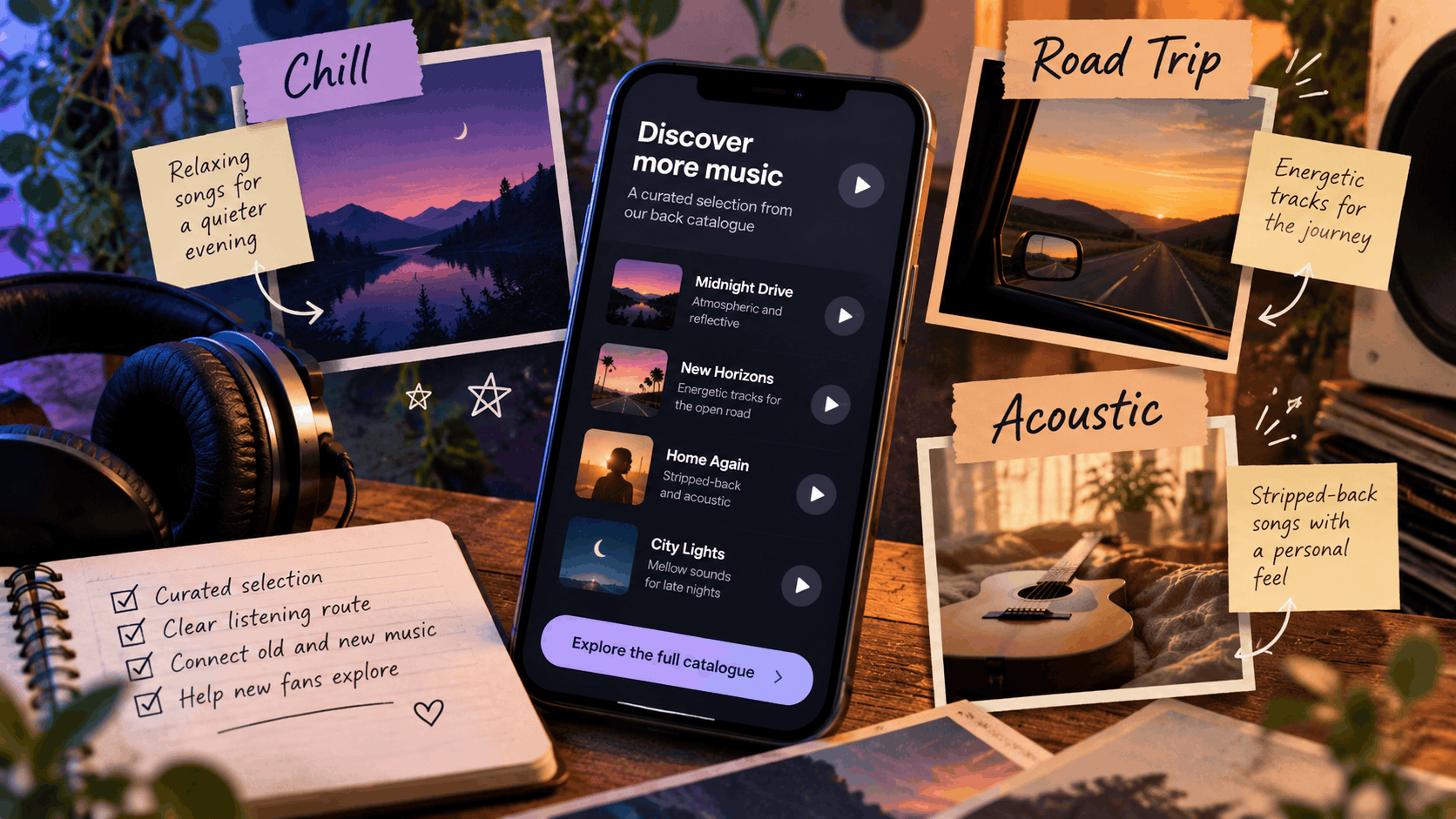
When you’ve built up a collection of singles, EPs and albums, giving fans access to everything at once isn’t always the most helpful approach.
A back catalogue music landing page offers a more focused way to introduce listeners to your music.
Instead of presenting your entire discography, you can group a selection of songs around a particular mood, setting or musical style.
Whether it’s relaxing acoustic tracks, energetic songs for a road trip or your most emotional recordings, a themed listening page can help fans discover more of your catalogue.
The aim is simple: give listeners a clear starting point and make exploring your music feel natural.
What is a back catalogue music landing page?
A back catalogue music landing page is a curated destination that introduces listeners to selected recordings from your existing music catalogue.
Rather than directing fans towards every song you’ve released, you choose a smaller collection connected by a particular theme.
For example, you might create a page featuring:
- Your most relaxing acoustic recordings.
- Energetic tracks for travelling.
- Songs suited to a late-night playlist.
- Your favourite stripped-back performances.
- An introduction to your band’s signature sound.
- Older releases that complement your latest single.
Each selection gives listeners a reason to explore particular songs.
Why organise music around a mood?
Listeners don’t always discover music by searching for a specific album or release date.
Sometimes, they’re looking for something that suits how they feel or what they’re doing.
Someone searching for relaxing music may appreciate a collection of quieter recordings, while another listener might prefer energetic tracks.
Organising your music around a recognisable theme can make your catalogue easier to navigate.
It also gives older recordings a fresh context without presenting them as new releases.
PUSH.fm’s Smart Links allow artists to bring music destinations together through one shareable link, making them useful for directing fans towards selected recordings.
Choose a listening theme that fits your music
Before creating your page, decide what connects the songs you want to feature.
Your theme should reflect the recordings themselves rather than simply using popular music-related keywords.
Think about how listeners describe music
Consider the words someone might use when describing the type of music they want to hear.
For example:
- Calm and reflective
- Energetic and upbeat
- Emotional and atmospheric
- Acoustic and intimate
- Dark and cinematic
- Nostalgic and mellow
You can also organise music around a particular setting or activity.
Examples include:
- Songs for a late-night drive.
- Acoustic music for a quiet evening.
- Upbeat tracks for getting ready.
- Relaxing songs for a Sunday morning.
- Atmospheric music for studying.
Choose a theme that genuinely represents the recordings.
Keep your descriptions accurate
If you describe your selection as mellow acoustic music, listeners should expect songs that broadly match that description.
Avoid including unrelated tracks simply because you want to promote them.
For example, a loud electronic remix might feel out of place on a page dedicated to stripped-back acoustic recordings.
That doesn’t mean every song needs to sound identical.
A little variety can make the selection more interesting, provided the overall theme remains clear.
Tip: Try describing your chosen theme in one sentence. If you struggle to explain what connects the recordings, your selection may need refining.
Curate a short selection of songs
Once you’ve chosen your theme, decide which recordings belong on the page.
You don’t need to include every song that loosely fits the mood.
A smaller, carefully selected collection can provide a more manageable introduction.
Start with three to five songs
For a simple themed page, three to five recordings can be a useful starting point.
This isn’t a strict rule, but it gives you enough variety to introduce your sound without overwhelming new listeners.
For example, an artist creating a late-night listening page might choose:
| Song | Musical quality | Why it fits the theme |
|---|---|---|
| Midnight Drive | Atmospheric production and a steady rhythm | Creates a reflective late-night atmosphere |
| Empty Streets | Minimal instrumentation and soft vocals | Offers a quieter listening experience |
| After the Rain | Gentle melodies and spacious production | Continues the relaxed mood |
| City Lights | Warm synthesisers and a slower tempo | Adds variety while maintaining the theme |
| Home Again | Acoustic instrumentation and intimate vocals | Provides a softer ending to the selection |
These are illustrative examples. Your descriptions should reflect your actual recordings.
Give every song a reason to be included
Rather than simply listing track titles, write a short description explaining what makes each recording relevant.
For example:
“Midnight Drive combines atmospheric synthesisers with a steady rhythm, making it a natural starting point for this late-night selection.”
Or:
“Empty Streets takes a more stripped-back approach, with soft vocals and minimal instrumentation.”
These descriptions help listeners understand what to expect before choosing a track.
Avoid inventing stories or meanings that aren’t supported by the recording.
If you’re discussing lyrical themes, make sure your interpretation accurately reflects the song.
Choose the right structure for your listening page
There are several ways to organise a themed music selection.
The best approach depends on how you want listeners to explore the recordings and which tools are available.
Two practical options are individual song links and curated playlists.
Option one: Link to individual songs
With this approach, each recording has its own listening destination.
You could create a music Smart Link for each track, allowing fans to choose their preferred supported streaming service.
For example:
Late-night listening collection
1. Midnight Drive
Atmospheric electronic music with a steady, reflective rhythm.
Listen to Midnight Drive → [Song Smart Link]
2. Empty Streets
A quieter recording built around intimate vocals and minimal instrumentation.
Listen to Empty Streets → [Song Smart Link]
3. After the Rain
A gentle, melodic track with spacious production.
Listen to After the Rain → [Song Smart Link]
This approach gives each song its own introduction and listening options.
Option two: Link to a curated playlist
Alternatively, you could create a playlist on a supported music streaming service.
The playlist would contain your selected recordings in an intentional order.
For example:
Our favourite late-night tracks
A collection of atmospheric, reflective songs from our back catalogue.
Listen to the playlist → [Playlist URL]
This approach keeps the selection together within the chosen streaming service.
However, listeners will need access to that service’s playback experience.
Which approach should you choose?
| Feature | Individual song links | Curated playlist |
|---|---|---|
| Listening experience | Fans select recordings individually | Songs are grouped into one playlist |
| Streaming services | Each song can offer multiple supported destinations | The playlist belongs to a particular streaming service |
| Song descriptions | Each recording can have its own introduction | Descriptions may be more limited |
| Organisation | Requires maintaining individual destinations | Requires maintaining the playlist |
| Best suited to | Guided discovery of selected recordings | Continuous listening through a themed collection |
Neither approach is automatically better.
Choose the structure that suits your audience and the listening experience you want to provide.
Important: Don’t assume that a Smart Link automatically creates playlists across streaming platforms or includes a built-in music player for your entire catalogue.
Use the features available in your setup and test the final destination before sharing it.
Create your back catalogue music page
Once you’ve selected your recordings and decided how listeners will access them, it’s time to organise the page.
The aim is to make the theme immediately understandable.
Start with a clear title
Your title should communicate the listening experience.
For example:
- [Artist name] – Songs for a late-night drive
- [Artist name] – Our quieter recordings
- [Artist name] – An introduction to our sound
- [Artist name] – Acoustic favourites
- [Artist name] – Music for reflective moments
Avoid vague titles that don’t explain what listeners will find.
A title such as ‘Our music’ doesn’t provide much guidance, whereas ‘Our favourite acoustic recordings’ gives visitors a clearer expectation.
Write a short introduction
Your introduction should explain who the selection is for and why you’ve chosen these songs.
For example:
“New to our music? These four recordings are a starting point if you enjoy atmospheric production, reflective lyrics and slower electronic sounds.”
Keep the wording natural and relevant to your actual music.
Add your selected recordings
For each song, include:
- The official track title.
- A short description of the recording.
- A clear listening invitation.
- The correct destination URL.
Make sure listeners can distinguish between individual songs and playlists.
For example, ‘Listen to Midnight Drive’ is clearer than a generic button labelled ‘Click here’.
Include an optional next step
Once listeners have explored your selection, you can invite them to discover more.
Depending on your catalogue, this might include:
- Your latest single.
- A related EP.
- Another themed playlist.
- Your full artist profile.
- An upcoming release campaign.
Keep the next step relevant to the theme.
The purpose is to guide listeners towards another suitable recording rather than overwhelm them with unrelated links.
Use this back catalogue music page template
You can adapt the following structure for your own release catalogue.
Page title
[Artist name] – [Clear listening theme]
Introduction
“New to our music? These [number] songs are a great starting point if you enjoy [accurate description of the sound, mood or musical style].”
Song one
[Track title]
[Short description of the recording and why it fits the theme.]
Listen to [Track title]: [Verified listening link]
Song two
[Track title]
[Short description highlighting a different musical quality.]
Listen to [Track title]: [Verified listening link]
Song three
[Track title]
[Short description explaining how the song complements the selection.]
Listen to [Track title]: [Verified listening link]
Optional next step
“Enjoyed these tracks? Explore [another relevant release or listening destination].”
Explore more music: [Verified link]
This template can be expanded or shortened depending on the number of recordings you want to feature.
Keep the descriptions concise and make sure every link opens the advertised destination.
Connect your latest release with older music
A themed back catalogue page can also support your current promotional campaigns.
If your latest single shares a mood or musical style with older recordings, you can use it as an introduction to the rest of your catalogue.
Give older songs a relevant context
For example, imagine you’ve just released a quieter acoustic single.
You might introduce your themed page with:
“If you enjoyed the stripped-back sound of our latest single, here are three more recordings from our catalogue that explore a similar atmosphere.”
This connects your current release with existing music in a way that feels relevant.
It also gives new listeners a reason to explore songs they may not have discovered otherwise.
Keep the release information accurate
When featuring older recordings, make sure you’re clear about their original release status.
Don’t describe an existing track as a new release simply because you’re promoting it again.
Similarly, if you’re featuring an acoustic version, remix or live recording, identify the version accurately.
Fans should know which recording they’re opening.
Keep your themed page focused
You can use your latest release to introduce a themed selection without turning the entire page into an unrelated promotional campaign.
For example, if your page is dedicated to relaxing acoustic music, an announcement about an upcoming electronic remix might not fit the theme.
Keep the listening experience consistent with the invitation you’ve shared.
PUSH.fm’s Smart Links can help you organise destinations for individual recordings, while Fan Links provide a way to bring different promotional destinations together.
Make your back catalogue page easy to navigate
A useful listening page should be straightforward to explore.
Fans shouldn’t have to guess which recording a button opens or where a link will take them.
Use descriptive link labels
Instead of generic labels such as:
- Click here
- Listen
- More
- Open link
Use wording that explains the destination.
For example:
- Listen to Midnight Drive
- Explore our acoustic recordings
- Open the late-night playlist
- Discover our latest single
This makes the page easier to understand.
Check the mobile experience
Many fans will discover your page through social media, where links are commonly opened on mobile devices.
Before sharing your page, check:
- Whether the page loads correctly.
- Whether the title and introduction are readable.
- Whether each song is clearly identified.
- Whether the listening buttons work.
- Whether the page is easy to navigate.
- Whether the destinations open the correct recordings.
Test the public version of the page rather than relying solely on the editing interface.
If you update any links, check the published page again.
Review how listeners interact with your page
Once your themed page is live, you can review the information available through your promotional tools.
This may help you understand which destinations visitors are choosing.
Understand what link statistics show
For example, outgoing clicks may indicate that visitors selected a particular song or streaming destination.
However, a click doesn’t necessarily confirm that someone listened to the entire recording.
Similarly, page visits don’t automatically tell you whether someone enjoyed the music or became a regular listener.
Use the available information to understand recorded interactions without making assumptions about behaviour you can’t verify.
Keep your catalogue links updated
Over time, your music catalogue may change.
You might:
- Release new recordings that fit the theme.
- Update a streaming destination.
- Remove an unavailable track.
- Replace a link that no longer works.
- Create a new playlist.
- Adjust the order of your selected songs.
Review your themed page occasionally to make sure the information remains accurate.
You can find further information about managing links and account features in the PUSH.fm Help Centre.
Maintain consistency when updating the page
If you’ve promoted a page as ‘Our favourite acoustic recordings’, avoid replacing the selection with unrelated electronic tracks.
Visitors arriving through older posts should still find something that broadly matches the original invitation.
You can update the recordings while preserving the overall theme.
Help new listeners discover more of your music
Your back catalogue is more than a collection of older releases.
It contains recordings that new listeners may not have discovered yet.
A themed music landing page gives those songs a clear context and makes it easier for fans to explore your work.
Rather than presenting your entire discography at once, choose a manageable selection connected by a recognisable mood, setting or musical style.
Explain why each recording belongs, provide accurate listening links and keep the page focused on the experience you’ve promised.
Whether you’re introducing fans to your quieter songs, energetic tracks or favourite acoustic performances, a carefully curated page can provide a useful starting point.
A few well-chosen recordings, connected by a clear theme, can help turn interest in one song into a deeper exploration of your music.