
A fan joins your mailing list through a Pre-save campaign. Another signs up after attending a gig. Someone else purchases your latest digital EP.
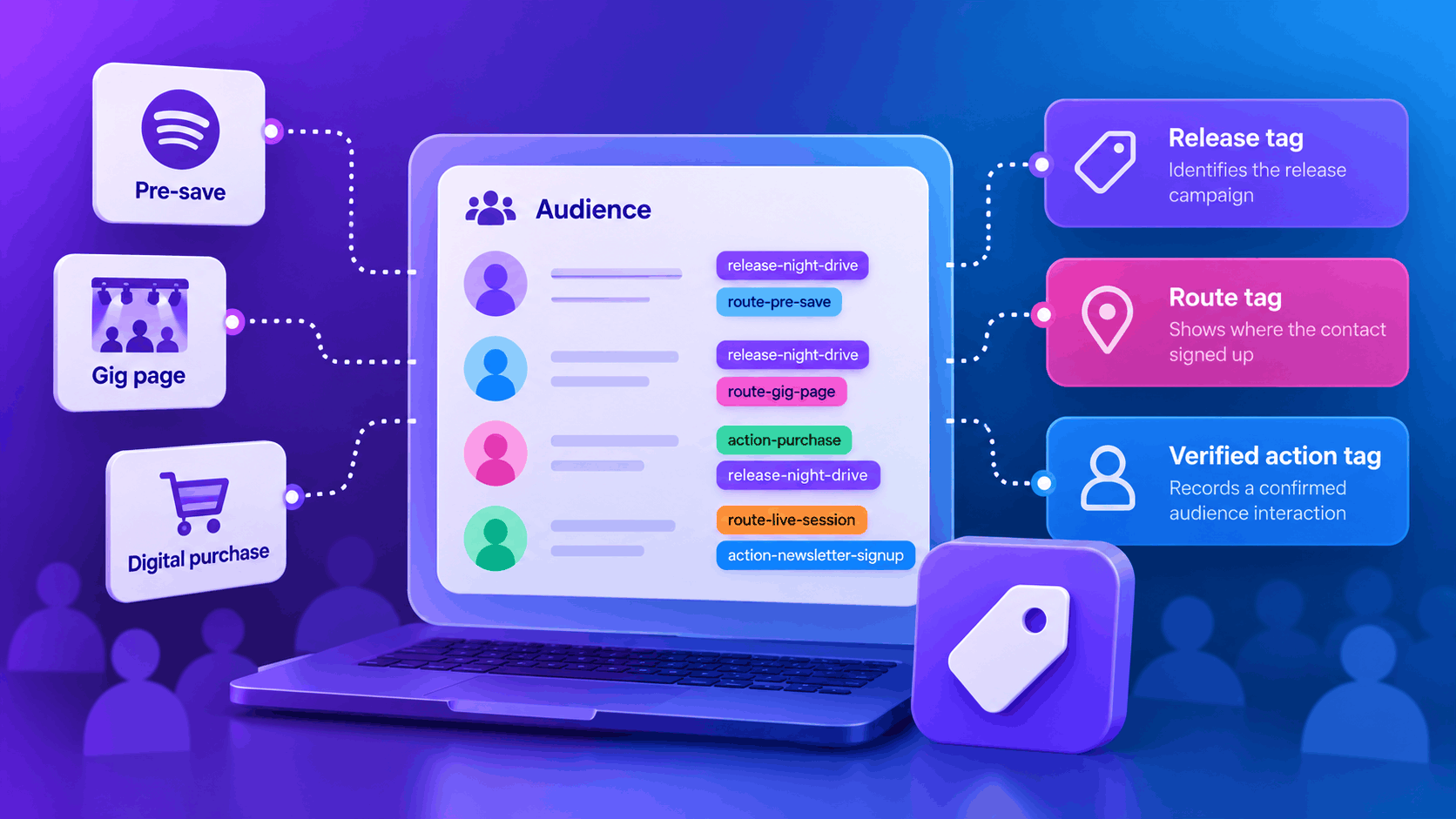
Although these fans have all interacted with your music, their journeys are different.
Understanding where your audience comes from and how they’ve engaged with your campaigns can help you organise your contacts and share more relevant updates.
That’s where a music audience tagging plan comes in.
By using a small set of consistent tags, you can organise contacts based on their release campaigns, signup routes and verified interactions.
The goal isn’t to create hundreds of complicated labels. It’s to build an organised audience list that you can understand, maintain and use effectively for future releases.
What is audience tagging in music marketing?
Audience tagging is a way of organising contacts using labels that describe specific information about their interactions with your music.
For example, you might want to identify fans who joined your mailing list during an album campaign or through a dedicated event page.
Rather than treating every contact as part of one large group, tags help you understand the context behind their interactions.
Why should artists use audience tags?
A clear tagging system can help you:
- Organise contacts from different release campaigns.
- Identify where fans signed up for updates.
- Keep track of verified audience interactions.
- Plan more relevant marketing communications.
- Maintain a clearer contact database.
- Prepare for future releases without starting from scratch.
However, tags should only represent information you can actually verify.
For example, someone joining through a Pre-save campaign doesn’t necessarily mean they’ve listened to your release.
Similarly, someone signing up through a gig-related page doesn’t automatically confirm they attended the event.
Your tags should describe recorded interactions rather than assumptions about fan behaviour.
PUSH.fm’s Audience tools can help artists organise contacts collected through their promotional campaigns.
Decide what each audience tag should mean
Before creating tags, establish a clear definition for each one.
This prevents confusion when you’re managing multiple campaigns or working with other members of your team.
For example:
release-night-drive
Identifies contacts associated with your release campaign titled Night Drive.
route-gig-page
Identifies contacts who signed up through a dedicated gig-related page.
action-newsletter-signup
Identifies contacts who completed a newsletter signup recorded by your setup.
Each tag communicates a specific piece of information.
Avoid making assumptions about your fans
A tag should never imply more than the available information supports.
For example:
- A Pre-save signup doesn’t necessarily confirm a completed stream.
- A gig-page signup doesn’t prove someone attended the performance.
- A digital download purchase doesn’t automatically indicate newsletter consent.
- A single interaction doesn’t establish that someone is a dedicated fan.
Keeping these distinctions clear helps you maintain a more accurate audience database.
Use three simple audience tag categories
You don’t need a complicated system to organise your audience effectively.
For most independent artists, three categories provide a useful starting point.
| Category | Example tag | What it records |
|---|---|---|
| Release | release-night-drive | The release campaign associated with the interaction |
| Route | route-live-session | The page or campaign route through which the contact arrived |
| Verified action | action-newsletter-signup | An action recorded by your setup |
These categories help separate the context of an interaction from the action itself.
Release tags
Release tags identify the music campaign associated with a contact.
For example:
- release-night-drive
- release-summer-ep
- release-debut-album
These labels can help you organise contacts across multiple releases.
Route tags
Route tags identify where a contact joined your audience.
For example:
- route-gig-page
- route-live-session
- route-fan-link
- route-release-page
Only use route information that your setup can verify.
If you share the same Fan Link in your Instagram bio and a YouTube description, a signup through that link doesn’t necessarily reveal which placement the person clicked.
Verified action tags
Action tags describe interactions that have actually been recorded.
For example:
- action-newsletter-signup
- action-digital-purchase
- action-event-registration
Only apply these labels when your tools provide reliable evidence that the action occurred.
Tip: Choose one naming convention and use it consistently. Whether you prefer hyphens or underscores matters less than ensuring everyone uses the same format.
Keep marketing permission separate from audience interest
One of the most important parts of audience management is understanding the difference between a recorded interaction and permission to receive marketing emails.
Someone purchasing your music hasn’t necessarily agreed to receive promotional messages.
Similarly, a contact appearing in your audience database doesn’t automatically mean you have permission to email them.
What should artists keep track of?
Where supported by your setup, maintain clear records of:
- How someone joined your mailing list.
- What information they were given when signing up.
- Whether they agreed to receive marketing communications.
- Any unsubscribe requests.
- Relevant consent information and preferences.
These details are particularly important when managing email marketing campaigns.
Don’t confuse purchases with newsletter signups
For example, a fan might purchase your digital EP without wanting to receive regular promotional emails.
You could record the purchase as an interaction if your system supports it, but that doesn’t automatically provide permission to send newsletters.
Keep marketing consent separate from audience tags.
PUSH.fm’s Fan Links allow artists to bring their music and promotional destinations together in one place.
If you’re collecting mailing-list signups through your promotional pages, explain what subscribers can expect before they join.
Create a simple audience tag dictionary
Once you’ve decided on your tagging categories, document them somewhere accessible.
A tag dictionary is a shared reference that explains what each label means and when it should be used.
This is especially useful if several people help manage your music marketing.
What should your tag dictionary include?
Create a document or spreadsheet with four columns:
| Tag | Meaning | When it is applied | Owner |
|---|---|---|---|
| release-night-drive | Contact associated with the Night Drive release campaign | When a qualifying release-campaign interaction is recorded | Marketing manager |
| route-live-session | Contact joined through the dedicated live-session page | When a signup through that page is recorded | Artist team |
| route-gig-page | Contact joined through the dedicated gig page | When a signup through that page is recorded | Artist team |
| action-newsletter-signup | Contact completed a newsletter signup | When the signup is successfully recorded | Mailing-list manager |
You can adapt these examples to suit your own workflow.
If you’re managing everything yourself, you can simply list yourself as the owner.
Why is a tag dictionary useful?
Without clear definitions, it’s easy to create several labels that mean essentially the same thing.
For example:
- live-session
- live_session
- live-show-signup
If these all describe the same interaction, your audience records can become unnecessarily complicated.
A tag dictionary helps you establish which label should be used and prevents duplicate naming conventions.
Avoid creating unnecessary audience tags
It’s tempting to create a new tag for every possible fan characteristic.
However, too many labels can make your audience harder to manage.
Start with the information that’s genuinely useful for your next release.
Focus on meaningful interactions
Useful tags might identify:
- A specific release campaign.
- A dedicated signup page.
- A verified newsletter registration.
- A recorded purchase, where available.
- A particular promotional campaign.
Avoid vague labels that don’t have a clear definition.
For example, a tag such as superfan may sound useful, but what does it actually mean?
Does it refer to someone who has purchased several releases, attended multiple shows or simply clicked a link?
Unless you have a consistent and appropriate definition, the label may not provide reliable information.
Remember: A smaller collection of well-defined tags is usually more useful than a large collection of unclear ones.
Use audience tags to plan more relevant emails
Once you’ve organised your contacts, you can use the available information to help plan your marketing communications.
The aim is to provide updates that are relevant to the context in which someone joined your audience.
Example: Fans who joined through a live session
Someone who signed up through a dedicated live-session page might be interested in hearing about another performance.
A relevant update could include:
- An upcoming live session.
- A new acoustic performance.
- A behind-the-scenes rehearsal video.
- A confirmed live event announcement.
However, the original signup doesn’t prove that the person wants every type of performance-related email.
Your communications should still reflect the expectations established when they subscribed.
Example: Fans who joined through a release campaign
Someone who requested updates about your upcoming EP may appreciate information about its release.
Relevant messages might include:
- The confirmed release date.
- A new single announcement.
- A link to the completed release.
- Information about exclusive content associated with the campaign.
These examples show how recorded context can help you choose useful content.
They don’t mean that every contact has the same preferences.
Keep your email marketing realistic
Audience tags can help you organise information, but they don’t automatically mean your platform supports every email marketing feature.
Before planning advanced segmentation, automated messages or scheduled campaigns, check which tools are available in your current setup.
You can explore PUSH.fm’s promotional features and resources through the PUSH.fm website.
Review your audience tags after each release
Your tagging plan shouldn’t be something you create once and forget about.
After each campaign, review the labels you’ve used and check whether they’re still useful.
Look for duplicate tags
Check for labels that describe the same thing but use different names.
For example:
- release-night-drive
- night_drive_release
- night-drive-campaign
If these all represent the same campaign, agree on a single naming convention.
Before changing or removing existing labels, make sure you won’t lose useful information.
Keep useful campaign history
A fan may interact with several releases over time.
For example, someone might have the following tags:
- release-debut-ep
- release-night-drive
- route-live-session
These labels can represent different interactions rather than competing categories.
There’s no need to replace every older release tag whenever you launch something new.
Keeping relevant campaign history can help you understand how contacts have engaged with your music over time.
Check your available tools
Before relying on audience filtering, exporting or other contact-management features, check what’s supported by your current PUSH.fm plan.
If a particular function isn’t available, you can still maintain your tag dictionary and use it to organise your marketing workflow.
The most important thing is that your system remains understandable and manageable.
Build a tagging plan for your next release
If you’re preparing to release a new single, EP or album, start with a simple plan.
You don’t need to organise your entire audience database at once.
A practical release tagging checklist
Before the campaign
- Choose a consistent naming convention.
- Create a tag for your upcoming release.
- Identify the signup routes you can reliably track.
- Define any verified actions you want to record.
- Document your tags in a shared dictionary.
- Check that your signup process clearly explains marketing permissions.
During the campaign
- Apply tags consistently where your setup supports them.
- Keep recorded actions separate from assumptions.
- Review new contacts for obvious inconsistencies.
- Make sure your marketing messages reflect subscriber expectations.
After the campaign
- Review the tags used.
- Identify duplicate or unclear labels.
- Preserve useful release history.
- Update your tag dictionary.
- Decide which labels will remain relevant for future campaigns.
This approach gives you a repeatable process that can grow alongside your music catalogue.
Keep your audience organised for future releases
An effective audience tagging plan doesn’t need to be complicated.
By using consistent labels for release campaigns, signup routes and verified interactions, you can create a clearer picture of how fans connect with your music.
The key is to record what you actually know rather than making assumptions about someone’s interests or behaviour.
Start with one release, a few clearly defined tags and a simple dictionary that explains how they’re used.
As your audience grows, you’ll have a more organised foundation for planning future campaigns and communicating with your fans.
Clear audience tags make it easier to understand recorded fan interactions and plan relevant music marketing without unnecessary complexity.