
The price of a digital music bundle is not the amount you necessarily keep from each order. Transaction charges, refunds and the costs of preparing the product can change the result.
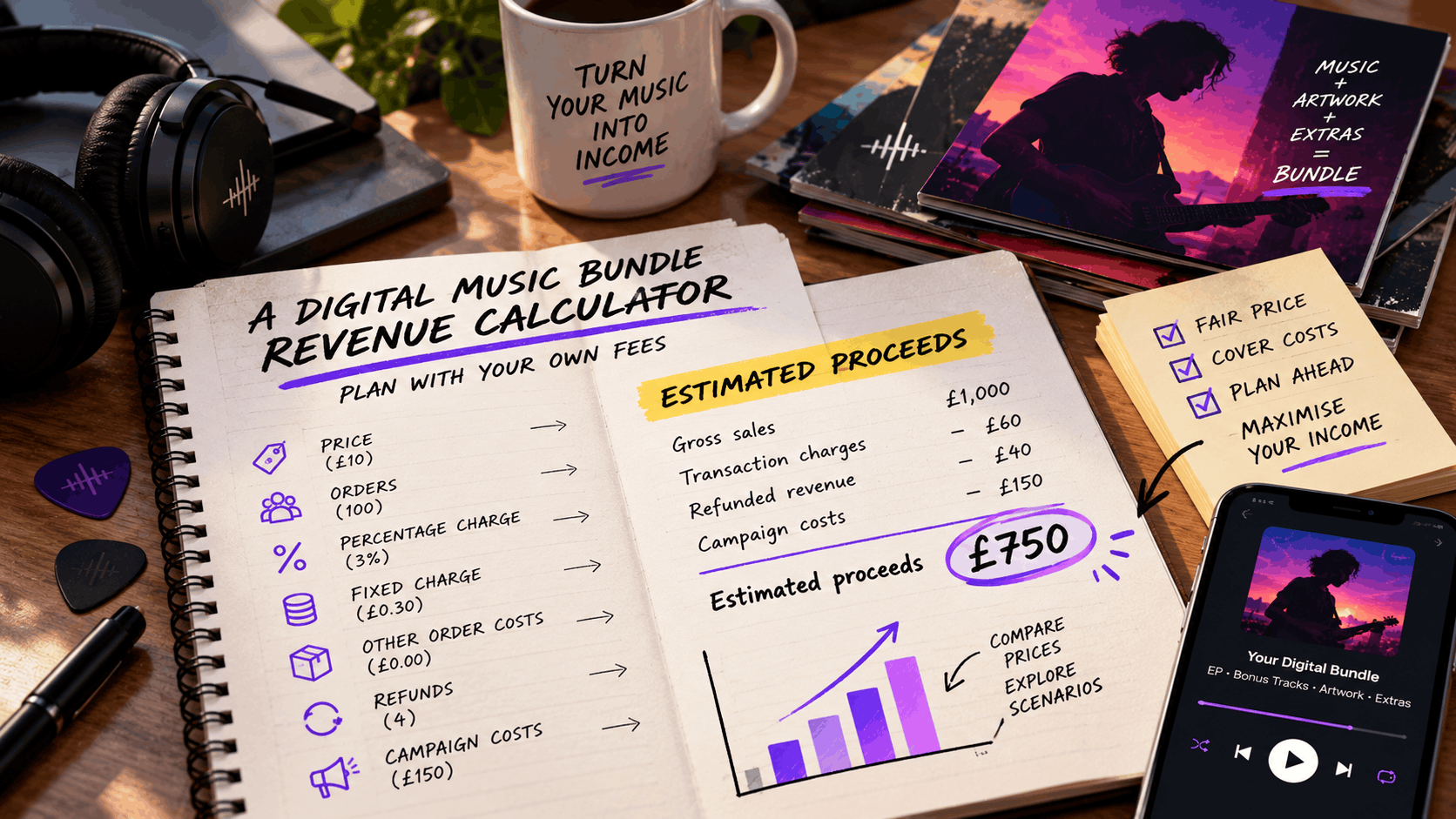
This digital music bundle revenue calculator gives you a manual worksheet for estimating proceeds. Use your own prices and verified charges, then compare a few scenarios before listing the product.
The worked figures below are illustrative. They are not PUSH fees, expected sales or earnings benchmarks.
Collect the inputs first
Choose one currency and keep the calculation consistent. Record the selling price you are modelling, the number of completed paid orders and the charges that apply to those orders.
Digital music bundle revenue calculator inputs
| Input | What to enter |
|---|---|
| Price | The amount per order used in your calculation |
| Orders | Completed paid orders, including any later refunded orders |
| Percentage charge | The applicable percentage of the price |
| Fixed charge | A fixed transaction charge per completed order |
| Other order costs | Any additional cost attached to each order |
| Refunds | Revenue returned to buyers |
| Returned fees | Charges credited back after refunds, if verified |
| Campaign costs | Fixed costs such as commissioned artwork or promotion |
Check your payment and sales reports for the actual fee basis. If charges vary by buyer, payment method or currency, calculate those groups separately or use the verified total charges instead of one average rate.
Separately collected taxes and charges assessed on a different amount need their own treatment. Keep them out of this simplified price-based model unless you have correctly included their effect.
If you are selling through PUSH.fm, review the Pay Link fees and charges before estimating your proceeds. The guide explains the platform’s published fee structure and highlights additional payment processing charges.
Calculate proceeds from one order
For a simple order without refunds, use the following calculation.
Proceeds per order formula
Proceeds per order = price − percentage charge − fixed charge − other order costs
If the percentage charge is calculated on the modelled price, multiply the price by that rate.
Suppose your illustrative price is £10, the percentage charge is 3%, the fixed charge is £0.30 and there are no other order costs.
The calculation would be:
£10 − £0.30 − £0.30 = £9.40
This means the estimated proceeds from one order would be £9.40 before any additional campaign costs or refunds.
Replace these assumptions with the charges in your own setup.
When using PUSH Pay Links to sell digital downloads, check the current payment arrangements before calculating what you expect to receive.
Add refunds and fixed costs
Transaction charges are only one part of the calculation. Refunds and fixed campaign expenses can also affect the amount you retain.
Estimated campaign proceeds formula
Estimated campaign proceeds = gross completed sales − transaction charges − other order costs − refunded revenue + returned fees − fixed campaign costs
Using the previous example, 100 completed orders at £10 each would generate £1,000 in gross sales.
After the assumed transaction charges, the estimated proceeds would be £940.
If four £10 orders were refunded and no transaction fees were returned, the calculation would become:
£940 − £40 = £900
Now subtract an illustrative £150 in fixed campaign costs.
£900 − £150 = £750
The estimated campaign proceeds would therefore be £750.
Avoid counting refunds twice
Do not remove refunded orders from the original order count and then subtract their full refunds again.
That would count the same reduction twice and produce an inaccurate result.
This worksheet starts with all completed orders, including those later refunded, before recording refunds separately.
Compare prices without predicting demand
Testing different prices can help you understand how your estimated proceeds change.
The following examples use the same illustrative transaction charges: a 3% percentage charge and a £0.30 fixed charge per order.
Each scenario assumes 100 completed orders, no refunds and £150 in fixed campaign costs.
Digital music bundle pricing comparison
| Price | Proceeds per order | Proceeds from 100 orders | After £150 fixed costs |
|---|---|---|---|
| £8 | £7.46 | £746 | £596 |
| £10 | £9.40 | £940 | £790 |
| £12 | £11.34 | £1,134 | £984 |
This table demonstrates the arithmetic rather than predicting actual sales.
A higher price increases the amount retained per order under these assumptions, but it may also affect how many customers decide to buy.
For this reason, it is worth calculating a lower-order scenario rather than assuming demand will remain unchanged at every price.
Make sure your digital bundle offers value
Pricing is important, but the contents and presentation of your digital music bundle also influence how customers understand the offer.
A bundle might include an EP, bonus tracks, artwork, lyrics or other downloadable extras.
Before setting your price, make sure the contents are complete and clearly described.
PUSH’s guide to packaging a digital EP bundle explains how to organise downloadable music, artwork and additional files into a product that fans can easily use.
Write a clear product description
Your sales page should explain exactly what customers receive.
Include the number of tracks, available audio formats, bonus content and any important download information.
Avoid vague descriptions that leave buyers uncertain about what is included.
PUSH’s guide to selling digital products using Pay Links covers adding product details, descriptions, pricing and artwork to a sales page.
Add an appropriate audio preview
An audio preview gives potential customers an opportunity to hear part of the recording before purchasing.
Choose a sample that accurately represents the music included in your bundle.
For more information, read PUSH’s article on adding an audio preview to a Pay Link.
Check the estimate against real sales
Once your digital music bundle is available to purchase, replace projected figures with actual sales information.
Record completed orders, refunds, transaction charges and other relevant expenses.
Compare your calculations with the available payment and sales records, allowing for payout timing and any adjustments identified in your reports.
If you use PUSH Pay Links, the PUSH guide to receiving Pay Link earnings explains how earnings are handled through the platform’s payout system.
Understand what your calculation does not include
This calculator estimates proceeds after the costs you enter.
It does not automatically account for unrecorded expenses, additional business costs or your personal tax position.
The results should therefore be treated as planning estimates rather than guaranteed profits.
Plan your digital music bundle before launch
A digital music bundle revenue calculator helps you understand how pricing, transaction charges, refunds and campaign expenses affect the amount you may retain.
Start by modelling three different prices using your own verified charges.
Compare the estimated proceeds and consider how different sales volumes could affect the outcome.
Keep your assumptions visible so you can update the calculation as actual sales information becomes available.
With a clear product description, an appropriate price and a realistic understanding of your costs, you can make more informed decisions before launching your next digital music bundle.