
In recent years, the streaming world has experienced a notable shift — from static playlists to dynamic, personalised listening experiences.
One of the most interesting developments from Spotify is the AI-powered DJ feature, which offers a tailored mix of music combined with commentary. Here’s how it works, what goes on behind the scenes, and how you can make the most of it.
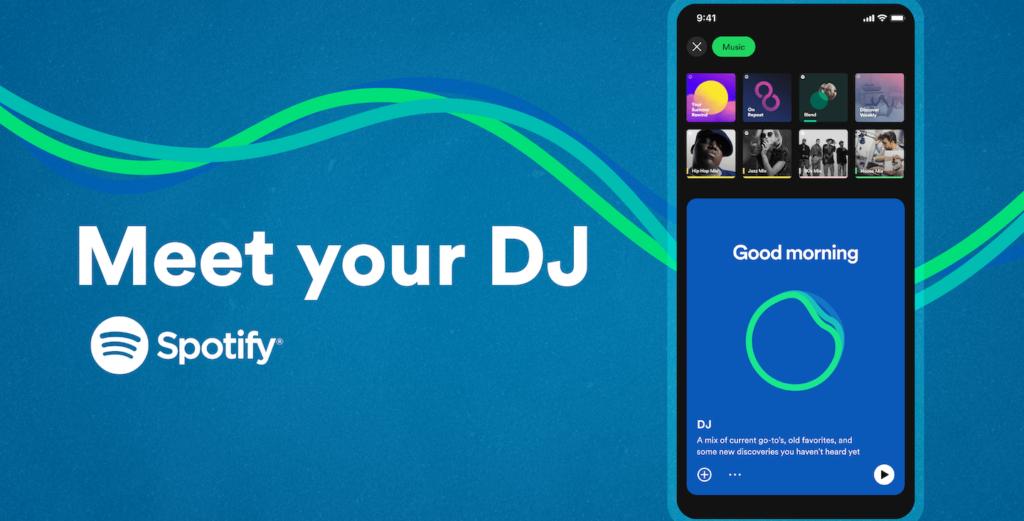
What is Spotify’s AI DJ?
Spotify describes the feature as “a personalised AI guide that knows you and your music taste so well that it can choose what to play for you”. (TechRadar)
In practical terms, the AI DJ appears as a specific “DJ” tile in the mobile app: once you tap it, you’ll hear a short voice-introduction followed by a stream of songs carefully selected for you, with occasional voice breaks offering context or commentary on what’s playing. (TechRadar)
The idea is both familiar — reminiscent of radio and curated playlists — and new: a listening experience that adapts continuously to your tastes, moods and habits.
The mechanics: how does it pick your songs?
1. Analysing your listening history
At the heart of the AI DJ is a deep understanding of your listening behaviour: what you play often, what you skip, which genres or artists you favour. Spotify’s existing recommendation infrastructure (such as the “Made for You” playlists) forms the foundation. (TechCrunch)
2. Mixing old favourites, recent plays and new discoveries
Rather than relying only on brand-new tracks, the AI DJ pulls from a range of sources:
- Songs you’ve listened to in the past,—including “old favourites” you may have forgotten. (The Scotsman)
- Tracks you’ve been playing recently and show a pattern of interest.
- New suggestions that the algorithm thinks you might like, based on your taste profile.
This mix helps keep the experience familiar yet fresh.
3. Incorporating human-curated expertise + algorithmic insight
According to reports, Spotify doesn’t rely solely on raw algorithmic output. They combine insights from music-experts (editors, curators) with generative AI to generate commentary and refine song grouping. (TechCrunch)
For example, the voice-intro might reference your listening habits and hint at what’s coming next — just like a real DJ. (Engadget)
4. Feedback loop and adaptability
The feature is designed to improve as you use it:
- If you skip songs early, that signals to the system something isn’t matching your mood or taste.
- If you “heart” or like tracks, that signals a positive preference.
- You can also actively ask for a change of vibe (see below).
So over time, the AI DJ becomes more tailored to your current mood, listening context and evolving taste. (NME)
How to use it (UK-friendly)
If you’re based in the UK (and you have Spotify Premium) here’s how to get started:
- Open the Spotify mobile app (iOS or Android). (Yahoo Tech)
- Tap on the Music tab or your Home tab and scroll until you see the DJ tile. (SoundGuys)
- Tap Play: the voice introduction will play, followed by your personalised stream. (TechRadar)
- If you’re not feeling the current mix, tap the DJ button (often in the bottom right) to switch mood/genre/artist. (The Scotsman)
Important notes:
- You must have Spotify Premium to access the AI DJ in most regions. (Yahoo Tech)
- Availability varies by country and by device: it launched in the US and Canada, then rolled out to the UK and other markets. (SoundGuys)
- As of the latest coverage, the voice commentary may not yet support all languages or regions. (Yahoo Tech)
What’s special and what’s not
What’s unique
- The voice commentary adds a more “radio-style” feel to streaming — you get short intro segments that explain what you’re about to hear, giving context. (Engadget)
- The mix of your tastes, nostalgia and new discoveries is dynamically blended — less manual playlist creation, more “lean-back mode”. (TechCrunch)
- The “change the vibe” option makes it responsive: you don’t have to leave the session to switch to something different.
Limitations to be aware of
- Some users report that the transitions or selections aren’t always perfect. One user noted: “The DJ really does exactly that… but sometimes adds some new pop music … but to be honest it breaks up the flavour fatigue.” (Reddit)
- Since the feature leans on your prior listening history, if your tastes are very eclectic or you’re exploring brand-new genres often, the recommendations may feel less precise initially.
- It’s still evolving. Feature availability, device-compatibility and regional roll-out may vary.
Why it matters
From a broader viewpoint, this feature highlights a few key trends in streaming and music consumption:
- Personalisation at scale: Rather than offering one-size-fits-all playlists, services like Spotify are moving towards truly custom listening experiences, adapting in real time.
- Passive listening: The AI DJ suits times when you don’t want to browse or pick a playlist yourself — you just want music and perhaps some brief commentary.
- Bridging human-and-machine curation: Although algorithms power the selections, there remains a human touch via commentary and expert insights.
- Artist discovery and nostalgia: By mixing old favourites with new suggestions, the feature works both for comfort listening and exploration.
Tips for making the most of it
- Embrace skips and likes: If the DJ plays something off-mark, skip it. If it nails something you love, like it. Both help refine the algorithm.
- Use the “change vibe” button: If your mood shifts (gym, chill-out, commute), don’t hesitate to switch the vibe rather than leaving the session.
- Mix up your listening habits: If you always listen to the same genre, the DJ might get too predictable. Try exploring something new — the AI DJ will incorporate that into future suggestions.
- Keep your app updated: To ensure you have the latest version and access to the feature (especially in new regions).
- Check device compatibility: If you primarily use desktop or web, note that some features may be optimised for mobile.
Spotify’s AI DJ represents a compelling evolution of music streaming: a blend of personal taste, discovery and commentary — delivered in a radio-style format that’s tailored just for you. While it’s not perfect, and it may take a little time for the algorithm to “learn you”, it offers a strong alternative to manually curated playlists. If you’re a Spotify Premium subscriber in the UK, it’s well worth giving it a try.


