
An audio interface is a piece of hardware that expands and improves the sound capabilities of your computer.
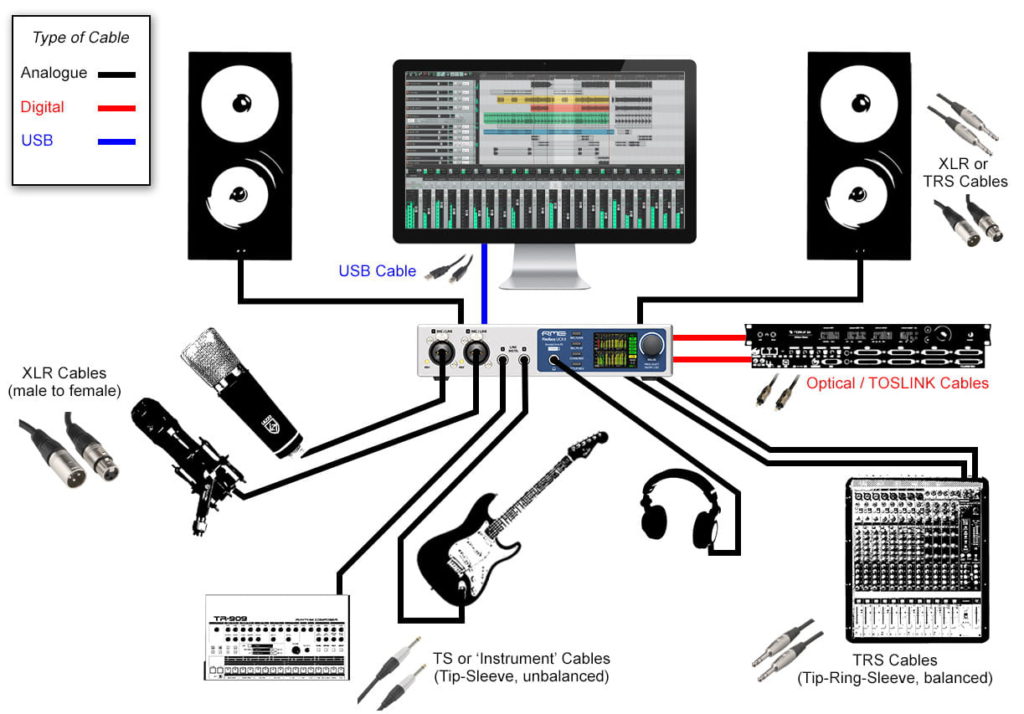
Think of it as an external sound card. It acts as the bridge between the analogue world (real-world sounds like your voice or a guitar) and the digital world (your computer and music software).
Why your computer needs an extra box
Technically, your computer already has a built-in audio interface—it is what powers your laptop speakers and headphone port. However, these built-in systems are designed for Zoom calls and watching Netflix, not for making music.
Here are the three main reasons your computer needs a dedicated external box:
1. It translates sound (The conversion problem)
Computers cannot understand raw sound waves. They only understand data—ones and zeros.
- Input: When you sing into a microphone, the audio interface takes that analogue electrical signal and translates it into digital data your computer can record. This is called Analogue-to-Digital Conversion (ADC).
- Output: When you press play on your music software, the interface takes that digital data and translates it back into an analogue signal so your speakers or headphones can vibrate and make sound. This is Digital-to-Analogue Conversion (DAC).
The chips inside a dedicated audio interface do this translation much faster and with vastly superior sound quality than the cheap chips inside a standard computer.
2. Standard plugs do not fit into computers
If you want to plug a professional studio microphone or an electric guitar into a computer, you will quickly notice a problem: the plugs do not match.
Professional microphones use chunky, three-pronged cables called XLR cables. Guitars use large $\frac{1}{4}$-inch jacks. A dedicated audio interface provides the correct, heavy-duty sockets to plug these instruments directly into your setup.
3. It prevents “latency” (Audio delay)
Have you ever tried to record yourself, but heard your voice coming back through your headphones a fraction of a second too late? That frustrating delay is called latency.
Because standard computer sound cards are not built for heavy-duty audio processing, they take time to process sound. A proper audio interface handles the heavy lifting, reducing this delay so much that it becomes completely unnoticeable.
Key features to look for on the box
When you look at a basic audio interface, you will usually see a few standard controls:
- Inputs (XLR / Jack): Where you plug in your microphones or instruments. Most beginner interfaces have one or two inputs.
- Gain knobs: These control the volume of the sound going into your computer. You turn them up until your signal is loud and clear, but not so loud that it distorts.
- Phantom Power ($+48\text{V}$): A button that sends electrical power down the microphone cable. You will need to switch this on if you are using a high-quality studio microphone (known as a condenser microphone).
- Monitor knob: Controls the volume of the sound coming out to your speakers or headphones.
The bottom line: If you want to record anything with a microphone, plug in a guitar, or use professional studio monitors, an audio interface is the essential bridge that makes it all possible.


